Built for roofing companies

Roofing CRM and proposal software, from first lead to final invoice

Track every roofing job on one board, import EagleView or RoofScope measurements, send branded Good / Better / Best proposals homeowners sign online, schedule the work, and turn signed jobs into orders and invoices, all on the same job record.

No credit card required. Paid plans begin after beta.

Job board from lead to paid
Good / Better / Best proposals with e-sign
EagleView & RoofScope import
Instant Quote for your website
My Roof CRM workflow
My Roof CRM job board showing roofing jobs from New lead to Signed
Built specifically for roofing companies
60-day early access beta
No credit card required during beta
Branded proposals and templates
Proposal to order and invoice handoff
How It Works

From first lead to signed job, on one record

Instead of rebuilding customer details, measurements and pricing across a proposal app, a CRM and spreadsheets, every step happens on the same roofing job.

Step 01

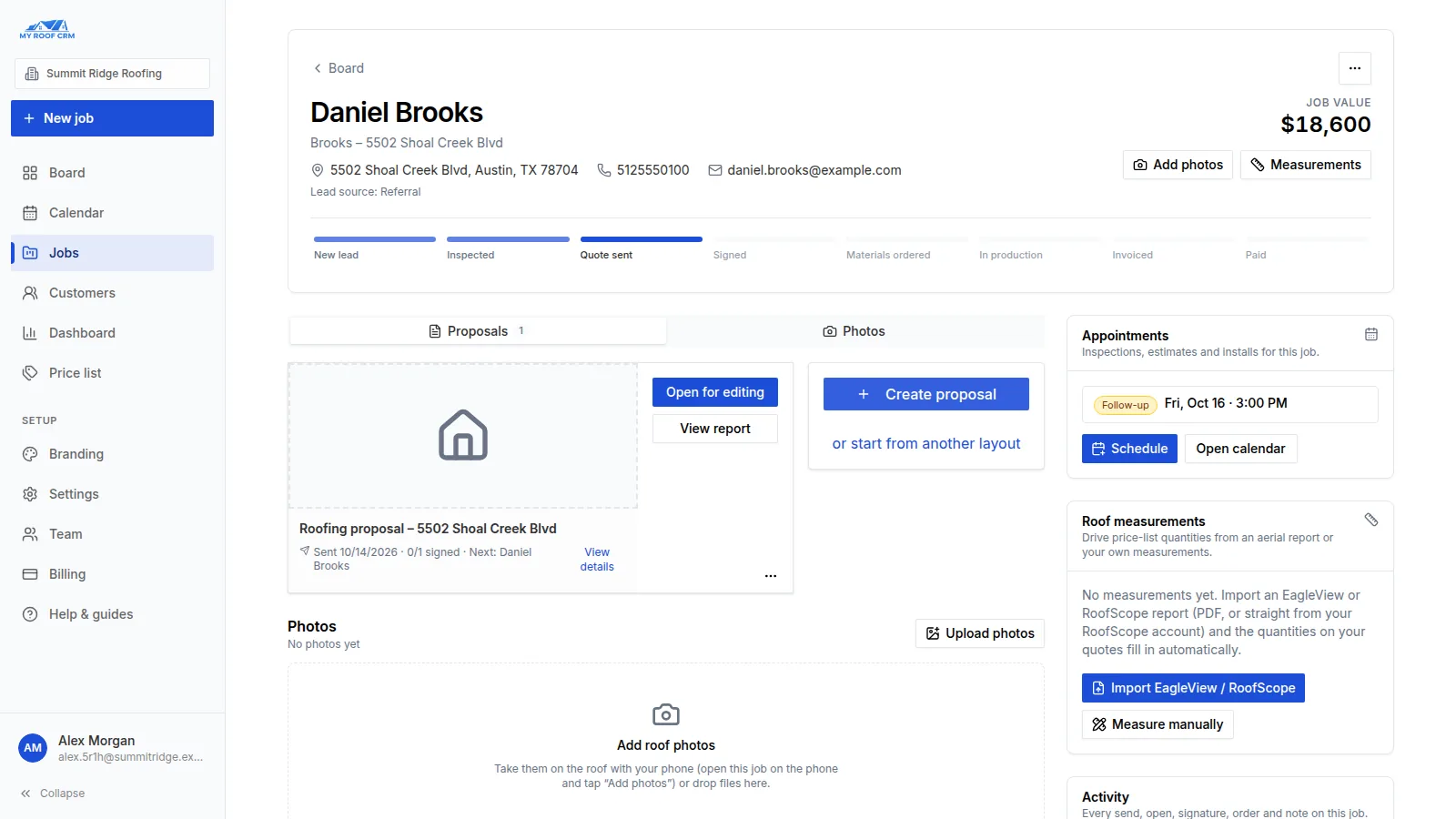
See every job on one board, from new lead to paid

Each roofing job is one record: the homeowner, the address, photos, appointments, proposals and a full history. Jobs move across the board as you work them, and move forward on their own when a proposal is sent, signed, ordered or invoiced.

  • Stages from New lead to Paid, with the value still to win
  • Photos from the roof straight from your phone
  • A timeline of every send, open, signature, order and note
Product preview
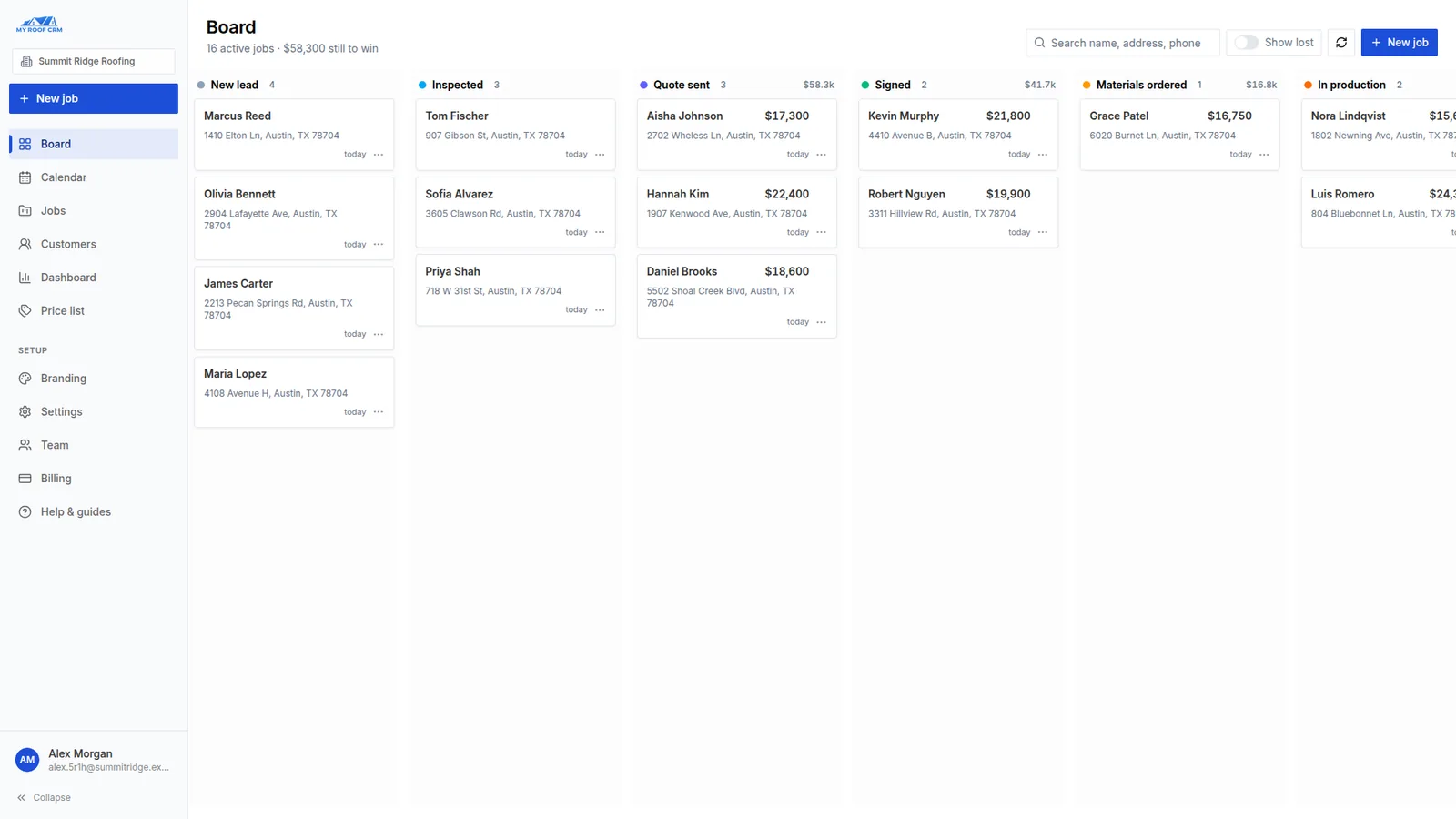
My Roof CRM job board with roofing jobs in New lead, Inspected, Quote sent and Signed columns
Step 02

Measure once and let the numbers fill your quote

Upload an EagleView or RoofScope PDF and the roof measurements are read in for you to check, or measure on the satellite map yourself. Price list items with formulas then fill in their own quantities.

  • EagleView and RoofScope PDF import with a review step
  • Order RoofScope reports from the job (with your RoofScope account)
  • Price list formulas turn squares, ridges and valleys into quantities
Product preview
A roofing job in My Roof CRM with proposals, appointments and roof measurements
Step 03

Send a branded proposal homeowners can choose from and sign

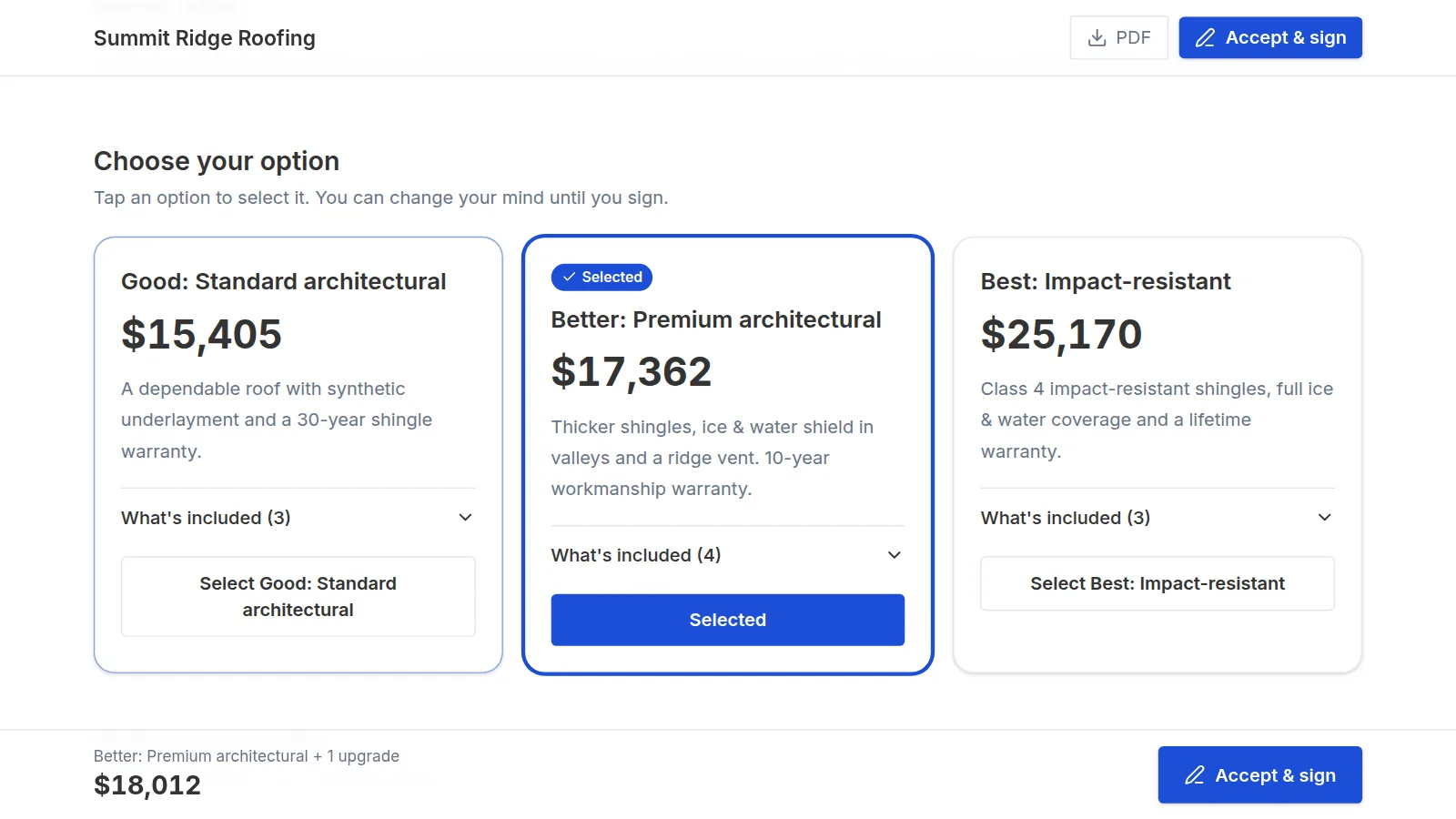
Proposals open as a web page with your logo and colours. Homeowners compare Good, Better and Best options, add upgrades, see the running total and sign on their phone. No account or PDF back-and-forth.

  • Good / Better / Best options with what is included in each
  • Optional upgrades, inspection photos and warranty pages
  • You see when it was opened, and the signed version is locked
Product preview
A homeowner choosing between Good, Better and Best roofing options in a My Roof CRM proposal
Step 04

Let homeowners price their own roof on your website

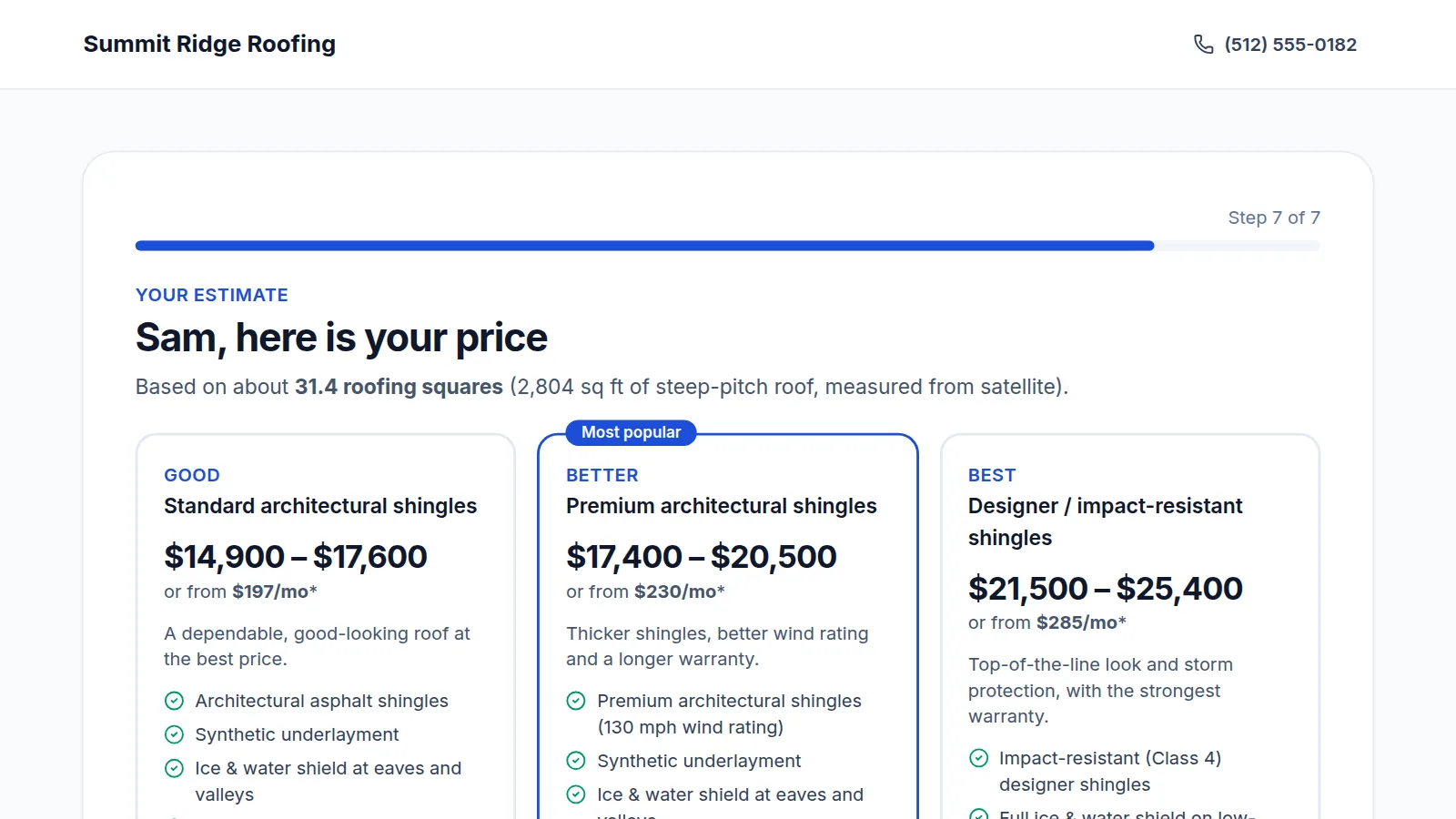
Instant Quote is a page for your website and ads. A homeowner enters their address, the roof is measured from satellite data where available, they learn what a proper roof includes, and they see your Good / Better / Best price range. Each request lands on your board as a new lead.

  • Your prices per square, waste, steep-roof and extra-layer rules
  • Website embed code or a link for ads and posts
  • Every request becomes a lead, with an email to you right away
Product preview
A homeowner seeing Good, Better and Best roof price ranges in the My Roof CRM Instant Quote tool
Features

Everything a roofing job needs, from lead to invoice

Six parts that work together on the same job record. Each one is live today; see the list below for what is still being built.

Leads to paid

Job board

Every job, its homeowner, photos and history in one place, organised by stage so nothing falls through the cracks.

  • Eight stages from New lead to Paid
  • Phone photo capture straight onto the job
  • Activity timeline with every proposal event
Fewer typing errors

Measurements

Bring in roof measurements from aerial reports or measure yourself, then let your price list do the maths.

  • EagleView and RoofScope PDF import
  • RoofScope connection to search and order reports
  • Measure on the satellite map
Faster yes

Proposals and e-signatures

Branded web proposals built from reusable layouts, templates and your price list, signed online by one or more homeowners.

  • Good / Better / Best options and optional upgrades
  • Remote signing or sign in person
  • Open tracking and a locked signed version
Fewer "when are you coming?" calls

Calendar and homeowner emails

Schedule inspections, estimates and installs on each job, and let ready-made messages keep homeowners informed.

  • Week, month and list views with team filters
  • Appointment confirmations with a calendar invite
  • Day-before reminders and stage updates by email
More informed leads

Instant Quote

A "price your own roof" tool for your website that educates homeowners and sends you the lead.

  • Satellite roof measurement where data exists
  • Your Good / Better / Best prices and rules
  • Leads on your board with roof size and choice
Less admin after close

Orders and invoices

Turn the signed proposal into material orders, work orders and invoices without typing the job again.

  • Orders created from the approved quote
  • Invoices with taxes from approved work
  • Everything stays on the same job
Built To Grow

Useful on day one for solo roofers, repeatable for growing teams

Whether you are standardizing your first proposal process or tightening handoff across multiple reps, the workflow stays simple, repeatable, and customer-ready.

Solo roofers

Look professional from the first proposal without stitching together PDFs, notes, and follow-up across separate tools.

Send branded proposals faster
Keep admin light between jobs
Growing crews

Standardize layouts, templates, pricing, and branding so quality does not depend on which rep sent the quote.

Standardize what every rep sends
One board the whole team can see
Established teams

Keep sales, production, and billing aligned by carrying approved job data forward instead of restarting after the close.

Cleaner internal handoff
Lower re-entry and missed-detail risk
Where It Stands

What works today, and what is coming next

My Roof CRM is in early access. Here is exactly what you can use now and what we are still building, so you can judge the fit before you start.

Working today

  • Job board, job records, photos and activity timeline
  • Branded web proposals with Good / Better / Best options and e-signatures
  • Price list with formulas, layouts and templates
  • EagleView and RoofScope PDF import; RoofScope account connection
  • Calendar with appointment confirmations and reminders by email
  • Instant Quote "price your own roof" tool and website embed
  • Material orders, work orders and invoices with taxes
  • Team seats with owner and member roles
  • Help Center with step-by-step guides

Not available yet

  • Text message (SMS) reminders and updates
  • Online payments from invoices
  • QuickBooks sync
  • Google Calendar sync
  • Homeowner portal and crew scheduling
  • A native phone app (today it runs in the phone browser)

Need one of these before you can switch? Book a call and tell us; it helps us decide what to build first.

Ways To Start

Start with the 60-day beta, then choose a paid plan after launch

The beta is open now with Pro-level access and no credit card. Starter and Pro prices are shown so you know what comes after the beta.

Save with annual billing
Recommended

Early Access Beta

Freefor 60 days

Pro-level access during beta with no credit card required.

  • Pro-level access during beta
  • No credit card required
  • Keep your jobs and data when paid plans start
Start 60-Day Free Beta

Starter

$59/month

For solo roofers and small crews getting organized.

  • 1 seat included
  • 30 sent proposals/month
  • Unlimited projects/leads
  • Quotes, invoices, and taxes included
Available After Beta

Pro

$129/month

For active roofing teams ready to run proposals, signatures, and invoices in one place.

  • 5 seats included
  • Unlimited sent proposals
  • Unlimited layouts and templates
  • E-sign with up to 3 signers per proposal
Available After Beta
Enterprise

Custom rollout for larger roofing teams

Custom pricing

For larger roofing teams needing custom onboarding, support, and workflow capacity.

Everything in Pro
Custom seats
Custom onboarding
Custom support
Custom contracts
Migration support options

Best for

Teams that need custom onboarding, support, workflow capacity, and rollout planning.

We will help map your process, team size, and launch needs before recommending the right setup.

Contact Us

Need help deciding?

Join the beta if you want hands-on testing now, or book a meeting if you want to talk through rollout before the public launch.

Talk to Us
FAQ

Questions roofers ask before trying My Roof CRM

Straight answers about what it does, what it does not do yet, and what it costs.

My Roof CRM is web-based software for residential roofing companies. It keeps each job on one record and covers the job board, roof measurements, branded proposals with Good / Better / Best options and e-signatures, scheduling with homeowner emails, a "price your own roof" tool for your website, and material orders and invoices.

Roofing contractors, from solo roofers to teams with several sales reps, who want proposals, job tracking and paperwork in one place instead of spread across a proposal app, a CRM and spreadsheets.

That is what it is built for: branded proposals with options, upgrades and e-signatures, plus a job board, calendar and orders and invoices on the same job. It does not yet take online payments or sync with QuickBooks, so check those against your needs.

Yes. Upload an EagleView or RoofScope PDF on a job and the measurements are read in for you to review before they are used. With a RoofScope account you can also search and order RoofScope reports from the job.

Homeowners enter their address on your website. Where satellite data exists the roof is measured automatically; otherwise they enter their home size. They answer a few questions, see what a proper roof includes, and get a price range for each of your options based on your price per square and rules. Every request becomes a lead on your board.

No. Homeowners open a link, choose an option and any upgrades, and sign on a phone or computer.

Not yet. Appointment confirmations, reminders and stage updates go out by email today. Text messages are being added next.

There is no app to install. My Roof CRM works in the browser on phones, tablets and computers, including taking roof photos straight onto a job from your phone.

New companies start with 60 days free during the early access beta, with Pro-level access and no credit card. After the beta, Starter is $59 per month (1 seat, 30 sent proposals a month) and Pro is $129 per month (5 seats, unlimited proposals). Paying yearly lowers that to $49 and $109 per month. Larger teams can ask for a custom plan.

You can set your branding, add your price list and send a first proposal on the same day. The Help Center walks through each step, and you can book a call if you would like help setting up.
Start Early Access

Set your branding, send a live proposal, and see the workflow on a real job

The fastest way to evaluate My Roof CRM is to run one active job through the system. Join the 60-day beta, send a polished proposal, and see how much friction you can remove from signature and handoff.

No credit card required. Paid plans begin after beta.